To reproduce the case, put its notebook and accompanying inputs in the same folder. Use the Python environment set up in the installation tutorial. Start with the original parameters and compare the result with the check reported below.
Run this example yourself. The OneSimulation Runtime brings the full Python library and an MCP server for Codex and Claude Code. It starts with a seven-day trial, then from €19 per month before any applicable tax.
What it computes
OneSimulation builds the rim from a revolved barrel, a disc, circular patterns of windows and lug holes, edge fillets and a drilled valve hole, finds holes and fillets with their radii, and removes the 3 mm fillets and the valve hole either by removing their faces or by rolling back the modelling history.
What it checks
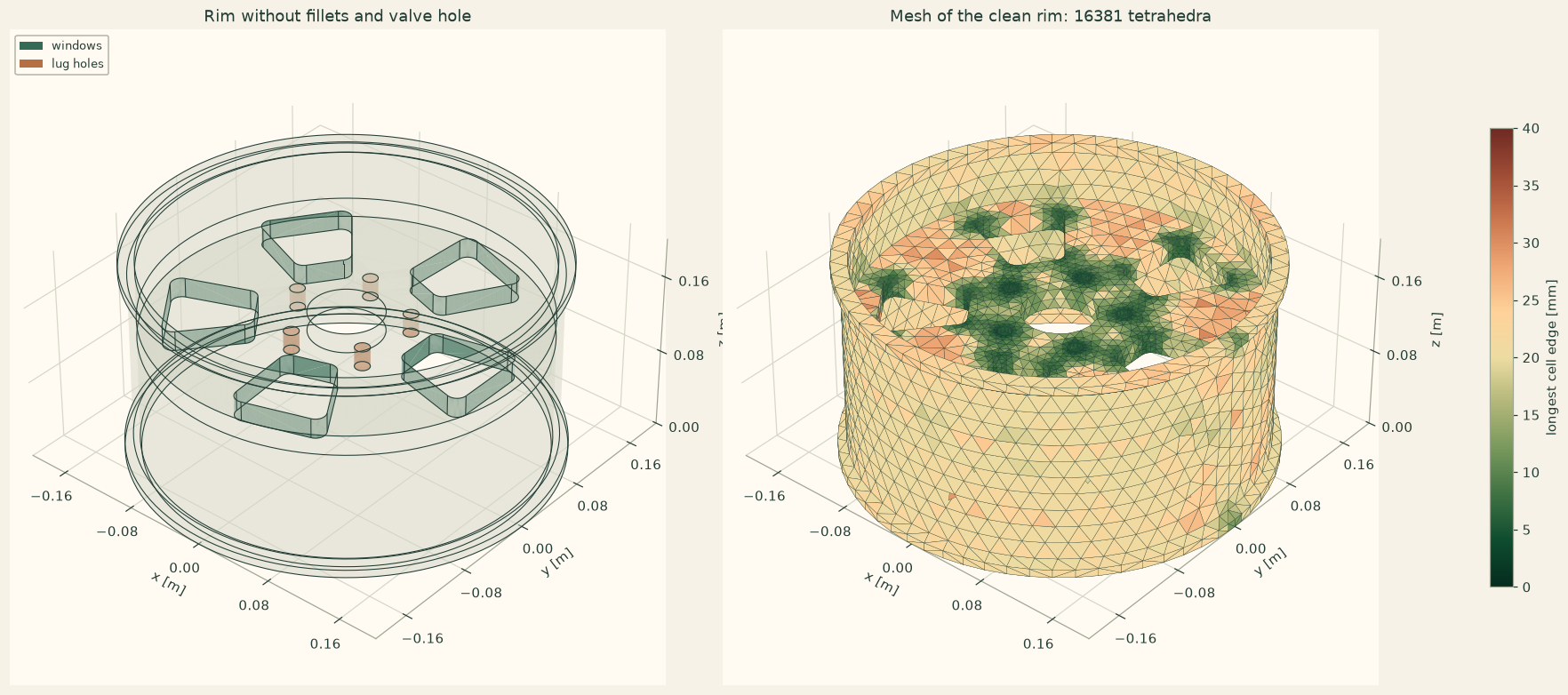
Both clean rims match the volume of the rim built without the details (3279.478 cm3) to 1.1e-7 and 4e-15; the faces fall from 100 to 59 and the mesh at the same size from 66,936 to 16,381 tetrahedra, with the shortest cell edge rising from 1.0 to 1.9 mm.
The notebook
The complete notebook, cell by cell. Run it to produce the figures and the comparison printout.
CAD models made for manufacturing carry details that matter for the drawing but not for the simulation: small fillets, chamfers, engravings, valve and vent holes. Each of them forces small cells, and a mesh of the whole part becomes many times larger than the physics needs. Clean-up removes such details from the CAD model before meshing.
| operation | call | what it does |
|---|---|---|
| find details | part.details() | holes, fillets, pockets and patterns with their radius or width |
| remove chosen faces | part.remove_faces(selection) | the faces of the details are removed and the faces around them extended over the gap |
| roll back | part.history(), part.rolled_back(n), part.suppressed(step) | the last steps are undone, or one step is left out and the rest rebuilt |
Reference. The rim built the same way without the 3 mm window fillets and the 4 mm valve hole: the clean rim must have its volume. The volumes of the meshes must match the volume of the body they were made for.
from collections import Counter

import numpy as np
from onesim.cad.d2 import Profile
from onesim.cad.d3 import CircularPattern, Cylinder, Prism, Revolution, UnionFromObjects
from onesim.meshing import TetrahedralMesher
from onesim.meshing.quality import quality
from onesim.visualization import plots, theme

theme.set()
The rim
The barrel is the revolved cross-section of a 16 inch rim, 200 mm wide, with its two flanges. The disc sits 120 mm from the outer edge; five windows (a rounded quadrilateral swept through the disc and repeated about the axis), five lug holes of 14 mm and a centre bore of 70 mm are cut out. Then the window edges on the face of the disc are rounded with 3 mm and a valve hole of 8 mm is drilled through the barrel.
mm = 1e-3
barrel = Revolution(
    profile=Profile.polygon(
        [
            (185 * mm, 0),
            (200 * mm, 0),
            (200 * mm, 8 * mm),
            (192 * mm, 14 * mm),
            (192 * mm, 186 * mm),
            (200 * mm, 192 * mm),
            (200 * mm, 200 * mm),
            (185 * mm, 200 * mm),
            (185 * mm, 190 * mm),
            (186 * mm, 10 * mm),
        ]
    )
)
window = Prism(
    profile=Profile.rounded_polygon(
        [
            (80 * mm, -25 * mm),
            (160 * mm, -45 * mm),
            (160 * mm, 45 * mm),
            (80 * mm, 25 * mm),
        ],
        10 * mm,
    ),
    height=40 * mm,
).moved((0, 0, 110 * mm))
lug = Cylinder(radius=7 * mm, length=40 * mm, origin=(57 * mm, 0, 110 * mm)).rotated(
    (0, 0, 1), np.pi / 5
)
plain = (
    UnionFromObjects(
        objects=[
            barrel,
            Cylinder(radius=186 * mm, length=20 * mm, origin=(0, 0, 120 * mm)),
        ]
    )
    - Cylinder(radius=35 * mm, length=40 * mm, origin=(0, 0, 110 * mm)).named("bore")
    - CircularPattern(window, (0, 0, 1), 5).named("window")
    - CircularPattern(lug, (0, 0, 1), 5).named("lug")
)
drilled = plain - Cylinder(
    radius=4 * mm, length=30 * mm, origin=(175 * mm, 0, 60 * mm), axis=(1, 0, 0)
).named("valve")
rim = drilled.fillet(
    3 * mm,
    edges=drilled.select(
        edges=lambda edge: abs(edge.start[2] - 0.14) < 1e-9
        and abs(edge.end[2] - 0.14) < 1e-9
        and 0.07 < np.hypot(edge.start[0], edge.start[1]) < 0.17
    ),
)
print(
    f"rim: {len(rim.faces)} faces, {len(rim.edges)} edges, volume {rim.measure * 1e6:.3f} cm3, valid {rim.is_valid}"
)
print(f"modelling steps: {', '.join(type(step).__name__ for step in rim.history())}")

detailed = TetrahedralMesher(target_size=0.02).generate(rim)
view = plots.Camera(elevation=35, azimuth=-50)
fig = plots.figure(1, 2, size=(16, 7))
plots.geometry(
    rim,
    selection={
        "3 mm fillets": rim.boundaries.fillet,
        "valve hole": rim.boundaries["valve.outer_wall"],
    },
    labels=False,
    camera=view,
    title="Wheel rim with its small details",
    ax=fig[0],
)
plots.mesh(
    detailed,
    groups=("all",),
    legend=False,
    camera=view,
    title=f"Mesh with all details: {detailed.cell_count} tetrahedra",
    ax=fig[1],
)
plots.show()
Finding the details
details() reports every hole and fillet with its radius. The rounded window corners of the profile (10 mm) are found as fillets too, the lug holes, the bore and the inside of the barrel as holes.
found = Counter((item.kind, round(item.radius / mm, 1)) for item in rim.details())
for (kind, radius), count in sorted(found.items()):
    print(f"{count:3d} x {kind:7s} radius {radius:6.1f} mm")
Removing them
Two ways to the clean rim: removing the faces of the 3 mm fillets and of the valve hole from the finished rim, or rolling back the fillet step in the history and removing the valve hole.
clean = rim.remove_faces(rim.boundaries.fillet | rim.boundaries["valve.outer_wall"])
by_hand = rim.rolled_back(1).remove_faces(drilled.boundaries["valve.outer_wall"])
print(
    "body                         faces   edges   volume [cm3]   against the rim built without details"
)
for name, body in {
    "rim with details": rim,
    "fillets and valve removed": clean,
    "rolled back, valve removed": by_hand,
    "built without details": plain,
}.items():
    print(
        f"{name:28s} {len(body.faces):6d} {len(body.edges):7d} {body.measure * 1e6:13.4f} {body.measure / plain.measure - 1:+16.1e}"
    )

meshes = {
    "rim with details": detailed,
    "fillets and valve removed": TetrahedralMesher(target_size=0.02).generate(clean),
    "rolled back, valve removed": TetrahedralMesher(target_size=0.02).generate(by_hand),
}
print(
    "mesh                        cells   shortest edge [mm]   smallest shape   volume error"
)
for name, mesh in meshes.items():
    report = quality(mesh)
    reference = rim.measure if name == "rim with details" else plain.measure
    print(
        f"{name:25s} {mesh.cell_count:8d} {1e3 * report['shortest_edge'].min():14.2f} {report['shape'].min():16.3f}"
        f" {100 * (report['size'].sum() / reference - 1):+12.3f} %"
    )
Figure
The clean rim with its window edges sharp again, and its mesh: the cells along the windows and around the valve position are as large as the rest.
fig = plots.figure(1, 2, size=(16, 7))
plots.geometry(
    clean,
    selection={
        "windows": clean.boundaries["window.side"],
        "lug holes": clean.boundaries["lug.outer_wall"],
    },
    labels=False,
    camera=view,
    title="Rim without fillets and valve hole",
    ax=fig[0],
)
plots.mesh(
    meshes["fillets and valve removed"],
    cell_values=1e3 * quality(meshes["fillets and valve removed"])["longest_edge"],
    limits=(0, 40),
    label="longest cell edge [mm]",
    camera=view,
    title=f"Mesh of the clean rim: {meshes['fillets and valve removed'].cell_count} tetrahedra",
    ax=fig[1],
)
plots.show()
Going further
Remove the 10 mm window corner rounds too, merge the faces of a smooth patch with TetrahedralMesher(merged_faces=...), or compare the stresses of a wheel load on the rim with and without its details.