To reproduce the case, put its notebook and accompanying inputs in the same folder. Use the Python environment set up in the installation tutorial. Start with the original parameters and compare the result with the check reported below.
Run this example yourself. The OneSimulation Runtime brings the full Python library and an MCP server for Codex and Claude Code. It starts with a seven-day trial, then from €19 per month before any applicable tax.
What it computes
OneSimulation finds the open rims of the skin and fills them without new points, thins the skin out to a tolerance, lays even triangles of a chosen size on the same surface and fills the result with tetrahedra that keep the skin triangle for triangle. The script that writes the damaged STL file comes with the notebook.
What it checks
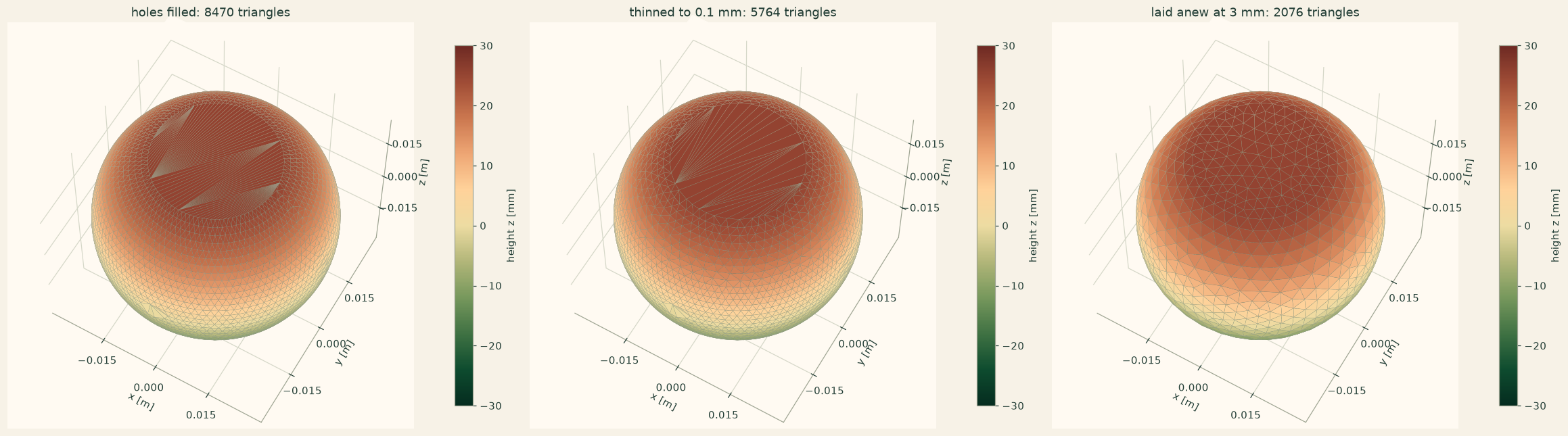
Both holes are found (198 and 18 rim points) and closed; thinning to 0.1 mm keeps every point within 14 um of the sphere with 30 % fewer triangles, the even 3 mm skin has 2,076 triangles, the closed body has 111.13 cm3 against about 110.87 cm3 for the sphere less a flat cap, and the 17,016 tetrahedra fill the skin exactly (smallest shape 0.52).
The notebook
The complete notebook, cell by cell. Run it to produce the figures and the comparison printout.
Surface meshes from scanners, from image segmentation or from other programs are rarely ready for meshing: they have holes where the scanner could not see, millions of tiny triangles, and long thin triangles that spoil the cells behind them. OneSimulation edits them as facet bodies:
| step | call | what changes |
|---|---|---|
| find holes | body.holes() | the open rims of the skin, each as a loop of points |
| fill holes | body.closed(largest=...) | rims filled from their points; openings longer than largest stay |
| thin out | body.simplified(tolerance) | as few triangles as keep every point within the tolerance of the skin |
| lay anew | FacetMesher(target_size=...).skin(body) | even triangles of about the target size on the same surface |
| fill | FacetMesher(target_size=..., keep_facets=True) | tetrahedra inside; the skin is kept triangle for triangle |
The file surface_mesh_editing_repair.stl is written by surface_mesh_editing_repair_geometry.py from the dense skin of a ball of radius \(R\) = 30 mm, without the cap above \(z_c\) = 25 mm and without a small torn patch on its side.
Reference. A skin on the sphere has all its points at the distance \(R\) from the centre. A flat patch over the cap opening leaves out the cap of height \(h = R - z_c\), so the closed body has about \(\tfrac43\pi R^3 - \tfrac13\pi h^2 (3R-h)\); the rim of the opening follows the triangles, so it lies a little above \(z_c\).
import numpy as np
from onesim.cad.exchange import load
from onesim.meshing import FacetMesher
from onesim.meshing.quality import quality
from onesim.visualization import plots, theme

theme.set()
Reading and inspecting
The distance of the points from the centre measures how far a skin strays from the sphere; the points of the flat patch over the cap opening are left out of it.
radius, cap = 0.03, 0.025
scan = load("surface_mesh_editing_repair.stl")
stray = (
    lambda body: 1e6
    * np.abs(
        np.linalg.norm(body.points[body.points[:, 2] < cap - 0.001], axis=1) - radius
    ).max()
)
print(
    f"scan: {len(scan.triangles)} triangles, {len(scan.points)} points, closed {scan.is_closed}, "
    f"largest distance from the sphere {stray(scan):.2f} um"
)
print(
    f"open rims: {len(scan.holes())}, with {', '.join(str(len(rim)) for rim in scan.holes())} points"
)
Filling, thinning out, laying anew
The holes are filled without adding points. The skin is then thinned out to 0.1 mm and laid anew with triangles of 3 mm.
closed = scan.closed()
thinned = closed.simplified(1e-4)
even = FacetMesher(target_size=0.003).skin(thinned)
height = radius - cap
expected = 4 / 3 * np.pi * radius**3 - np.pi * height**2 * (3 * radius - height) / 3
print(
    "skin                 triangles   points   closed   volume [cm3]   largest distance from the sphere below the cap [um]"
)
for name, body in {
    "scan": scan,
    "holes filled": closed,
    "thinned to 0.1 mm": thinned,
    "laid anew at 3 mm": even,
}.items():
    volume = f"{body.measure * 1e6:13.4f}" if body.is_closed else f"{'open':>13s}"
    print(
        f"{name:19s} {len(body.triangles):10d} {len(body.points):8d} {str(body.is_closed):>8s} {volume} {stray(body):24.2f}"
    )
print(
    f"sphere less a flat cap: {expected * 1e6:.4f} cm3 (the filled cap rim lies a little above z = 25 mm)"
)

mesh = FacetMesher(target_size=0.003, keep_facets=True).generate(even)
report = quality(mesh)
view = plots.Camera(elevation=35, azimuth=-60)
fig = plots.figure(1, 2, size=(16, 7))
plots.geometry(
    scan,
    camera=view,
    title=f"Scan: {len(scan.triangles)} triangles, two holes",
    ax=fig[0],
)
plots.mesh(
    mesh,
    groups=("all",),
    legend=False,
    camera=view,
    title=f"Edited skin filled: {mesh.cell_count} tetrahedra",
    ax=fig[1],
)
plots.show()
Results
The volume mesh keeps the edited skin as it is: its volume is that of the skin to rounding.
print(
    f"volume mesh: {mesh.cell_count} cells, volume {report['size'].sum() * 1e6:.4f} cm3 against the skin {even.measure * 1e6:.4f} cm3; "
    f"smallest shape {report['shape'].min():.3f}, mean {report['shape'].mean():.3f}"
)
Figure
The skin after filling, after thinning out and after laying anew, seen on the filled cap, with every triangle drawn.
top = plots.Camera(elevation=60, azimuth=-60)
fig = plots.figure(1, 3, size=(21, 7))
for index, (name, body) in enumerate(
    {
        "holes filled": closed,
        "thinned to 0.1 mm": thinned,
        "laid anew at 3 mm": even,
    }.items()
):
    plots.trisurface(
        body.points,
        body.triangles,
        1e3 * body.points[:, 2],
        edges=True,
        limits=(-30, 30),
        label="height z [mm]",
        camera=top,
        title=f"{name}: {len(body.triangles)} triangles",
        ax=fig[index],
    )
plots.show()
Going further
Keep an opening that is meant to be one with closed(largest=...), split the skin into named faces along its sharp edges with split_boundaries, or add boundary layers to the volume mesh with BoundaryLayers(walls=...).