To reproduce the case, put its notebook and accompanying inputs in the same folder. Use the Python environment set up in the installation tutorial. Start with the original parameters and compare the result with the check reported below.
Run this example yourself. The OneSimulation Runtime brings the full Python library and an MCP server for Codex and Claude Code. It starts with a seven-day trial, then from €19 per month before any applicable tax.
What it computes
OneSimulation solves a coarse model of the shaft, then a separate fine model of the shoulder region whose cut faces take the displacement of the coarse model as a boundary callback; a finely meshed model of the whole shaft serves as reference. The script that builds both STEP files comes with the notebook.
What it checks
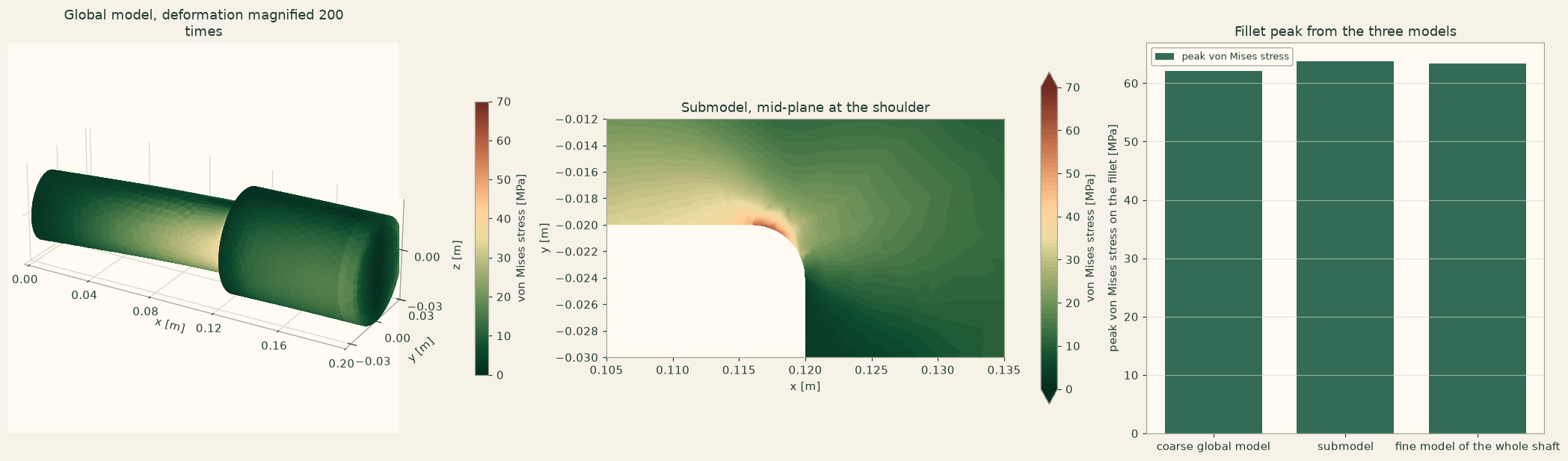
The submodel peak of 63.74 MPa (K_t = 1.669) agrees with the fine model of the whole shaft (63.32 MPa) within 0.65 %, the coarse model alone gives 62.04 MPa; the bending stress of the thin section follows beam theory within 2.2 % and the clamp reaction balances the 2 kN load to 0.01 %.
Geometry
The notebook starts at the import of the CAD files shaft_fillet_submodel.step, shaft_fillet_submodel_local.step: STEP (AP242), readable by any CAD program, with the names of the faces that the boundary conditions use. Put them next to the notebook.
The geometry script
The script shaft_fillet_submodel_geometry.py builds the geometry with the CAD objects of OneSimulation and writes the files. Change a dimension there, run it, and run the notebook again.
"""Geometry of the OneSimulation example "Submodel of a stepped shaft".

Builds a stepped steel shaft with the CAD objects of OneSimulation: 40 mm diameter over the first
120 mm, 60 mm diameter over the last 80 mm, joined by a shoulder fillet of 4 mm radius; the axis is
x. The whole shaft is written to shaft_fillet_submodel.step with the faces loaded (x = 0), clamped
(x = 200 mm) and fillet. The submodel, the part of the shaft between x = 100 mm and x = 140 mm
around the shoulder, is written to shaft_fillet_submodel_local.step with the faces cut (the two
cut planes) and fillet.
"""

import numpy as np
from onesim.cad.d3 import Box, Cylinder

small, large, step, length, radius = 0.020, 0.030, 0.120, 0.200, 0.004
shaft = Cylinder(radius=small, length=step, axis=(1.0, 0.0, 0.0)) | Cylinder(
    radius=large, length=length - step, origin=(step, 0.0, 0.0), axis=(1.0, 0.0, 0.0)
)
shaft = shaft.fillet(
    radius,
    edges=shaft.select(
        edges=lambda edge: abs(np.asarray(edge.start)[0] - step) < 1e-9
        and abs(np.linalg.norm(np.asarray(edge.start)[1:]) - small) < 1e-9
    ),
)
fillet = lambda part: part.select(
    faces=lambda face: face.kind not in ("plane", "cylinder")
)
whole = shaft.grouped(
    loaded=shaft.select(faces=lambda face: abs(face.center[0]) < 1e-9),
    clamped=shaft.select(faces=lambda face: abs(face.center[0] - length) < 1e-9),
    fillet=fillet(shaft),
)
whole.save("shaft_fillet_submodel.step")
local = shaft & Box(length=0.040, width=0.1, height=0.1, origin=(0.100, -0.05, -0.05))
local = local.grouped(
    cut=local.select(
        faces=lambda face: face.kind == "plane"
        and min(abs(face.center[0] - 0.100), abs(face.center[0] - 0.140)) < 1e-9
    ),
    fillet=fillet(local),
)
local.save("shaft_fillet_submodel_local.step")
The notebook
The complete notebook, cell by cell. Run it to produce the figures and the comparison printout.
The stress peak of a shaft sits in the small fillet at the shoulder, but the loads and supports act far away. Submodelling splits the work: a coarse model of the whole part carries the loads and supports, and a fine model of the detail is driven by the displacement of the coarse model on its cut faces. By Saint-Venant's principle the cut faces only need to lie far enough from the fillet.
The shaft is 40 mm in diameter over the first 120 mm and 60 mm over the last 80 mm, with a shoulder fillet of radius \(r=4\) mm (\(D/d=1.5\), \(r/d=0.1\)). It is clamped at the thick end and loaded at the thin end by a transverse force \(F=2\) kN, spread evenly over the end face.
| face | global model | submodel |
|---|---|---|
clamped (\(x=200\) mm) | \(\mathbf u=0\) | - |
loaded (\(x=0\)) | traction \(-F/A\ \mathbf e_y\) | - |
cut (\(x=100\) and \(140\) mm) | - | displacement of the global model |
| all other faces | free | free |
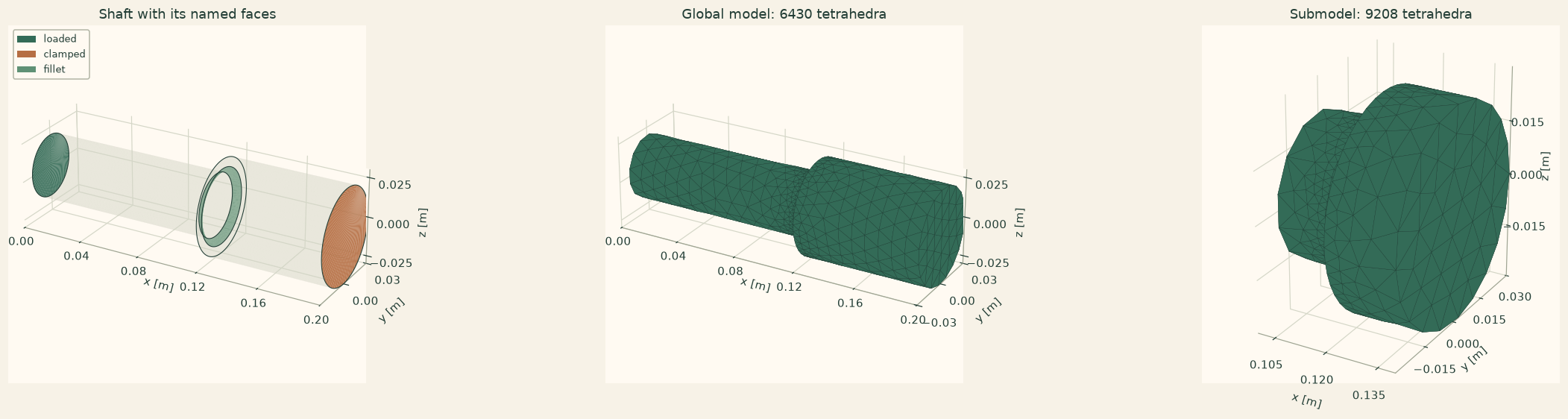
The shaft comes from the CAD file shaft_fillet_submodel.step, the submodel region from shaft_fillet_submodel_local.step; the script shaft_fillet_submodel_geometry.py builds both with the CAD objects of OneSimulation.
Reference. A finely meshed model of the whole shaft gives the fillet peak the submodel must reproduce. Away from the shoulder the bending stress follows beam theory, \(\sigma_{xx}=F\,x\,y/I\) with \(I=\pi d^4/64\) (tension on the upper side), and the nominal stress at the shoulder is \(\sigma_n=32Fx_s/(\pi d^3)\) (W. D. Pilkey and D. F. Pilkey, Peterson's Stress Concentration Factors, 3rd ed., Wiley (2008), Ch. 3, stepped round bars in bending).
import numpy as np
from onesim.cad.d2 import Plane
from onesim.cad.exchange import load
from onesim.materials import IsotropicSolid
from onesim.meshing import LocalRefinement, TetrahedralMesher
from onesim.numerics import Numerics
from onesim.numerics.fem import FiniteElement, Lagrange
from onesim.numerics.linear import SparseDirect
from onesim.physics.solid_mechanics import (
    FixedDisplacement,
    LinearElasticity,
    Traction,
    TractionFree,
)
from onesim.simulation import Problem, Simulation
from onesim.visualization import plots, theme

theme.set()
Geometry and meshes
Curved quadratic tetrahedra: the coarse global mesh has 10 mm cells and 5 mm on the fillet; the submodel and the fine reference model have 1.6 mm cells on the fillet.
shaft, local = load("shaft_fillet_submodel.step"), load(
    "shaft_fillet_submodel_local.step"
)
faces, cut_faces = shaft.boundaries, local.boundaries
mesh_on = lambda part, fillet, size: TetrahedralMesher(
    target_size=0.010,
    geometry_order=2,
    refinements=(LocalRefinement(region=fillet, target_size=size),),
).generate(part)
coarse, fine, detail = (
    mesh_on(shaft, faces.fillet, 0.005),
    mesh_on(shaft, faces.fillet, 0.0016),
    mesh_on(local, cut_faces.fillet, 0.0016),
)

view = plots.Camera(elevation=25, azimuth=-60)
fig = plots.figure(1, 3, size=(19, 5.5))
plots.geometry(
    shaft,
    selection={
        "loaded": faces.loaded,
        "clamped": faces.clamped,
        "fillet": faces.fillet,
    },
    labels=False,
    camera=view,
    title="Shaft with its named faces",
    ax=fig[0],
)
plots.mesh(
    coarse,
    groups=("all",),
    legend=False,
    camera=view,
    title=f"Global model: {coarse.cell_count} tetrahedra",
    ax=fig[1],
)
plots.mesh(
    detail,
    groups=("all",),
    legend=False,
    camera=view,
    title=f"Submodel: {detail.cell_count} tetrahedra",
    ax=fig[2],
)
plots.show()
Global model and reference
force, small, shoulder = 2000.0, 0.020, 0.120
steel = IsotropicSolid(
    density=7850.0,
    specific_heat_capacity=460.0,
    thermal_conductivity=50.0,
    youngs_modulus=210e9,
    poisson_ratio=0.3,
    thermal_expansion_coefficient=12e-6,
)
numerics = Numerics(
    spatial=FiniteElement(element=Lagrange(order=2)), linear_solver=SparseDirect()
)
model = LinearElasticity(domain=shaft.volume, material=steel)
problem = Problem(
    name="Stepped shaft",
    geometry=shaft,
    physics=(model,),
    boundary_conditions=(
        FixedDisplacement(boundary=faces.clamped, physics=model, value=(0.0, 0.0, 0.0)),
        Traction(
            boundary=faces.loaded,
            physics=model,
            value=(0.0, -force / (np.pi * small**2), 0.0),
        ),
        TractionFree(boundary=faces.all - faces.clamped - faces.loaded, physics=model),
    ),
)
global_result, reference_result = (
    Simulation(problem=problem, mesh=mesh, numerics=numerics).solve_stationary()
    for mesh in (coarse, fine)
)
global_displacement = global_result.field(model.displacement)
Submodel
The cut faces of the submodel take the displacement of the coarse global model, evaluated at their own nodes. Nodes on the round edge of a cut face may lie a hair outside the curved cells of the coarse mesh, so the field is read 0.1 % of the radius inside the surface.
sub = LinearElasticity(domain=local.volume, material=steel)
submodel = Simulation(
    problem=Problem(
        name="Shoulder submodel",
        geometry=local,
        physics=(sub,),
        boundary_conditions=(
            FixedDisplacement(
                boundary=cut_faces.cut,
                physics=sub,
                value=lambda x, y, z: global_displacement.evaluate(
                    np.column_stack((x, 0.999 * y, 0.999 * z))
                ),
            ),
            TractionFree(boundary=cut_faces.all - cut_faces.cut, physics=sub),
        ),
    ),
    mesh=detail,
    numerics=numerics,
).solve_stationary()
Results
The peak von Mises stress on the fillet from the three models, the stress concentration factor on the nominal stress at the shoulder, and the bending stress just inside the surface of the thin section against beam theory.
peaks = {
    name: result.field(physics.von_mises_stress)
    .sample(along=fillet, subdivisions=4)
    .values.max()
    for name, result, physics, fillet in (
        ("coarse global model", global_result, model, faces.fillet),
        ("submodel", submodel, sub, cut_faces.fillet),
        ("fine model of the whole shaft", reference_result, model, faces.fillet),
    )
}
nominal = 32 * force * shoulder / (np.pi * (2 * small) ** 3)
x = np.linspace(0.03, 0.08, 11)
top = global_result.field(model.stress).evaluate(
    np.column_stack((x, np.full_like(x, -0.99 * small), 0 * x))
)[:, 0]
beam = force * x * (-0.99 * small) / (np.pi * (2 * small) ** 4 / 64)

for name, peak in peaks.items():
    print(
        f"{name:30s} peak von Mises {peak / 1e6:7.2f} MPa, K_t = {peak / nominal:.3f}"
    )
print(
    f"submodel against the fine model of the whole shaft: {100 * (peaks['submodel'] / peaks['fine model of the whole shaft'] - 1):+.2f} %"
)
print(
    f"nominal stress at the shoulder {nominal / 1e6:.2f} MPa; bending stress along the thin section (x = 30 to 80 mm, away from load and shoulder), largest deviation from "
    f"beam theory {100 * np.max(np.abs(top / beam - 1)):.2f} %"
)
print(
    f"reaction at the clamp: {global_displacement.reaction(faces.clamped)[1]:.1f} N against the applied {force:.0f} N"
)
Figure
The von Mises stress on the deformed global model, in the mid-plane of the submodel around the fillet, and the three fillet peaks.
megapascal = lambda s, position: s / 1e6
fig = plots.figure(1, 3, size=(19, 5.5))
plots.surface(
    global_result.field(model.von_mises_stress),
    component=megapascal,
    deformation=global_displacement,
    deformation_scale=200.0,
    limits=(0, 70),
    camera=view,
    label="von Mises stress [MPa]",
    title="Global model, deformation magnified 200 times",
    ax=fig[0],
)
plots.section(
    submodel.field(sub.von_mises_stress),
    plane=Plane(origin=(0, 0, 0), normal=(0, 0, 1)),
    component=megapascal,
    limits=(0, 70),
    subdivisions=3,
    label="von Mises stress [MPa]",
    title="Submodel, mid-plane at the shoulder",
    xlimits=(0.105, 0.135),
    ylimits=(-0.03, -0.012),
    ax=fig[1],
)
plots.bars(
    list(peaks),
    {"peak von Mises stress": [peak / 1e6 for peak in peaks.values()]},
    ylabel="peak von Mises stress on the fillet [MPa]",
    title="Fillet peak from the three models",
    ax=fig[2],
)
plots.show()
Going further
Move the cut faces closer to the fillet in shaft_fillet_submodel_geometry.py and watch when the submodel starts to deviate, change the fillet radius only in the submodel, or add a torque at the loaded end for combined bending and torsion.