To reproduce the case, put its notebook and accompanying inputs in the same folder. Use the Python environment set up in the installation tutorial. Start with the original parameters and compare the result with the check reported below.
Run this example yourself. The OneSimulation Runtime brings the full Python library and an MCP server for Codex and Claude Code. It starts with a seven-day trial, then from €19 per month before any applicable tax.
What it computes
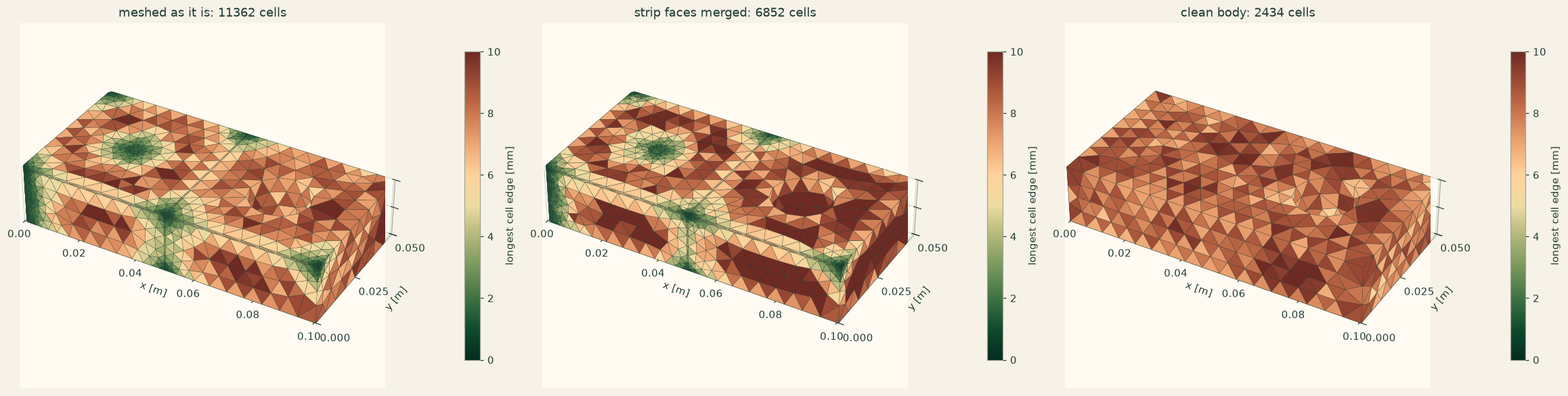
OneSimulation finds holes and rounds with their radius and the edges shorter than a length, removes narrow faces and small holes and rounds from the CAD model, and lets the mesher merge coplanar faces of the three pieces so that the mesh no longer follows the strip.
What it checks
Every stage matches its closed-form volume (93.921 cm3 as built, 93.946 cm3 without the groove, 94.217 cm3 without small details) to 2e-6 or better; the faces drop from 20 to 7, and the mesh from 11,362 cells with a shortest edge of 0.43 mm to 2,434 cells with 4.0 mm, while merging the strip faces alone already saves 40 % of the cells.
The notebook
The complete notebook, cell by cell. Run it to produce the figures and the comparison printout.
Small features force small cells: a mesher has to place nodes on every edge of the model, so an edge half a millimetre from another gives cells half a millimetre wide, however coarse the mesh is elsewhere. Typical culprits in imported parts are
| detail | how it arises | remedy in OneSimulation |
|---|---|---|
| sliver face | two pieces of a body that almost, but not quite, line up | part.defeatured(max_width=...), TetrahedralMesher(merged_faces=...) |
| short edge | a groove, a step or a chamfer far smaller than the part | part.short_edges(length) finds them, defeatured removes them |
| small hole | a vent, a pin hole, a thread core | part.defeatured(max_radius=...) |
| small round | an edge fillet of a casting or a deburred edge | part.defeatured(max_radius=...), remove_faces |
Reference. The block in closed form: three pieces of \(L_1 + s + L_2\) = 100.5 mm length, 50 mm width and 20 mm height, less a groove of \(g\times g\) = 0.5 x 0.5 mm along its length, a bore of 10 mm radius, a hole of 2 mm radius and two edge rounds of 1.5 mm radius: \(V = (L_1+s+L_2)\,W H - (L_1+s+L_2)\,g^2 - \pi(r_b^2 + r_h^2) H - 2\,(1-\pi/4)\,\rho^2 H\).
from collections import Counter

import numpy as np
from onesim.cad.d3 import Box
from onesim.meshing import TetrahedralMesher
from onesim.meshing.quality import quality
from onesim.visualization import plots, theme

theme.set()
The block
Pieces a and c are 50 mm long; between them the strip b is 0.5 mm wide. Their union keeps the faces of each piece, so the top, bottom and long sides consist of three faces each, one of them a sliver. The groove runs along the top front edge.
length, width, height, strip, groove = 0.05, 0.05, 0.02, 0.0005, 0.0005
total = 2 * length + strip
block = (
    Box(length=length, width=width, height=height).named("a")
    | Box(length=strip, width=width, height=height, origin=(length, 0.0, 0.0)).named(
        "b"
    )
    | Box(
        length=length, width=width, height=height, origin=(length + strip, 0.0, 0.0)
    ).named("c")
)
block = block - Box(
    length=total, width=groove, height=groove, origin=(0.0, 0.0, height - groove)
).named("groove")
block = block.hole(0.02, at=(0.075, 0.025, height)).hole(
    0.004, at=(0.025, 0.025, height)
)
part = block.fillet(
    0.0015,
    edges=lambda edge: abs(edge.start[2] - edge.end[2]) > 0.015
    and max(edge.start[0], edge.end[0]) < 1e-9,
)
exact = (
    total * width * height
    - total * groove**2
    - np.pi * (0.01**2 + 0.002**2) * height
    - 2 * (1 - np.pi / 4) * 0.0015**2 * height
)
without = total * width * height - np.pi * 0.01**2 * height
print(
    f"{len(part.faces)} faces, {len(part.edges)} edges; volume {part.measure * 1e6:.5f} cm3, closed form {exact * 1e6:.5f} cm3"
)

as_is = TetrahedralMesher(target_size=0.006).generate(part)
view = plots.Camera(elevation=35, azimuth=-60)
fig = plots.figure(1, 2, size=(16, 7))
plots.geometry(
    part,
    selection={
        "strip": part.boundaries.b,
        "groove": part.boundaries.groove,
        "small hole": part.boundaries["hole_2.outer_wall"],
        "edge rounds": part.boundaries.fillet,
    },
    labels=False,
    camera=view,
    title="Machined block and its small details",
    ax=fig[0],
)
plots.mesh(
    as_is,
    groups=("all",),
    legend=False,
    camera=view,
    title=f"Meshed as it is: {as_is.cell_count} tetrahedra",
    ax=fig[1],
)
plots.show()
Finding the details
details() lists holes and rounds with their radius, short_edges(length) the edges shorter than a length: here those of the groove and the strip.
for (kind, radius), count in sorted(
    Counter((item.kind, round(item.radius * 1e3, 2)) for item in part.details()).items()
):
    print(f"{count:3d} x {kind:8s} radius {radius:6.2f} mm")
print(f"edges shorter than 2 mm: {len(part.short_edges(0.002).members)}")
Removing them from the model
First the narrow faces (max_width), then the small holes and rounds (max_radius). What is left is the block with its bore.
no_slivers = part.defeatured(max_width=0.001)
clean = no_slivers.defeatured(max_radius=0.0025)
print("body                     faces   edges   volume [cm3]   closed form   deviation")
for name, body, reference in (
    ("as built", part, exact),
    ("without slivers", no_slivers, exact + total * groove**2),
    ("without small details", clean, without),
):
    print(
        f"{name:22s} {len(body.faces):6d} {len(body.edges):7d} {body.measure * 1e6:13.5f} {reference * 1e6:13.5f} {body.measure / reference - 1:+11.1e}"
    )
Merging faces in the mesh only
Without touching the model, merged_faces lets the faces of the three pieces on the bottom and the back count as one face each, so the mesh no longer follows the strip there; the faces keep their names and the nodes stay on the exact faces. The mesh of the clean body is the reference.
sides = [
    part.boundaries[f"a.{side}"]
    | part.boundaries[f"b.{side}"]
    | part.boundaries[f"c.{side}"]
    for side in ("z_min", "y_max")
]
meshes = {
    "meshed as it is": as_is,
    "strip faces merged": TetrahedralMesher(
        target_size=0.006, merged_faces=sides
    ).generate(part),
    "clean body": TetrahedralMesher(target_size=0.006).generate(clean),
}
print(
    "mesh                          cells   shortest edge [mm]   smallest shape   volume [cm3]"
)
for name, mesh in meshes.items():
    report = quality(mesh)
    print(
        f"{name:27s} {mesh.cell_count:7d} {1e3 * report['shortest_edge'].min():14.3f} {report['shape'].min():16.3f} {report['size'].sum() * 1e6:13.4f}"
    )
Figure
The three meshes coloured by the longest edge of their cells: the small cells along the strip, the groove and around the small hole disappear with the details.
fig = plots.figure(1, 3, size=(21, 6))
for index, (name, mesh) in enumerate(meshes.items()):
    plots.mesh(
        mesh,
        cell_values=1e3 * quality(mesh)["longest_edge"],
        limits=(0, 10),
        label="longest cell edge [mm]",
        camera=view,
        title=f"{name}: {mesh.cell_count} cells",
        ax=fig[index],
    )
plots.show()
Going further
Use part.comparison(clean) to list the faces that were removed and added, give a face of the clean body a boundary layer, or add the top and front faces of the three pieces to sides.