To reproduce the case, put its notebook and accompanying inputs in the same folder. Use the Python environment set up in the installation tutorial. Start with the original parameters and compare the result with the check reported below.
Run this example yourself. The OneSimulation Runtime brings the full Python library and an MCP server for Codex and Claude Code. It starts with a seven-day trial, then from €19 per month before any applicable tax.
What it computes
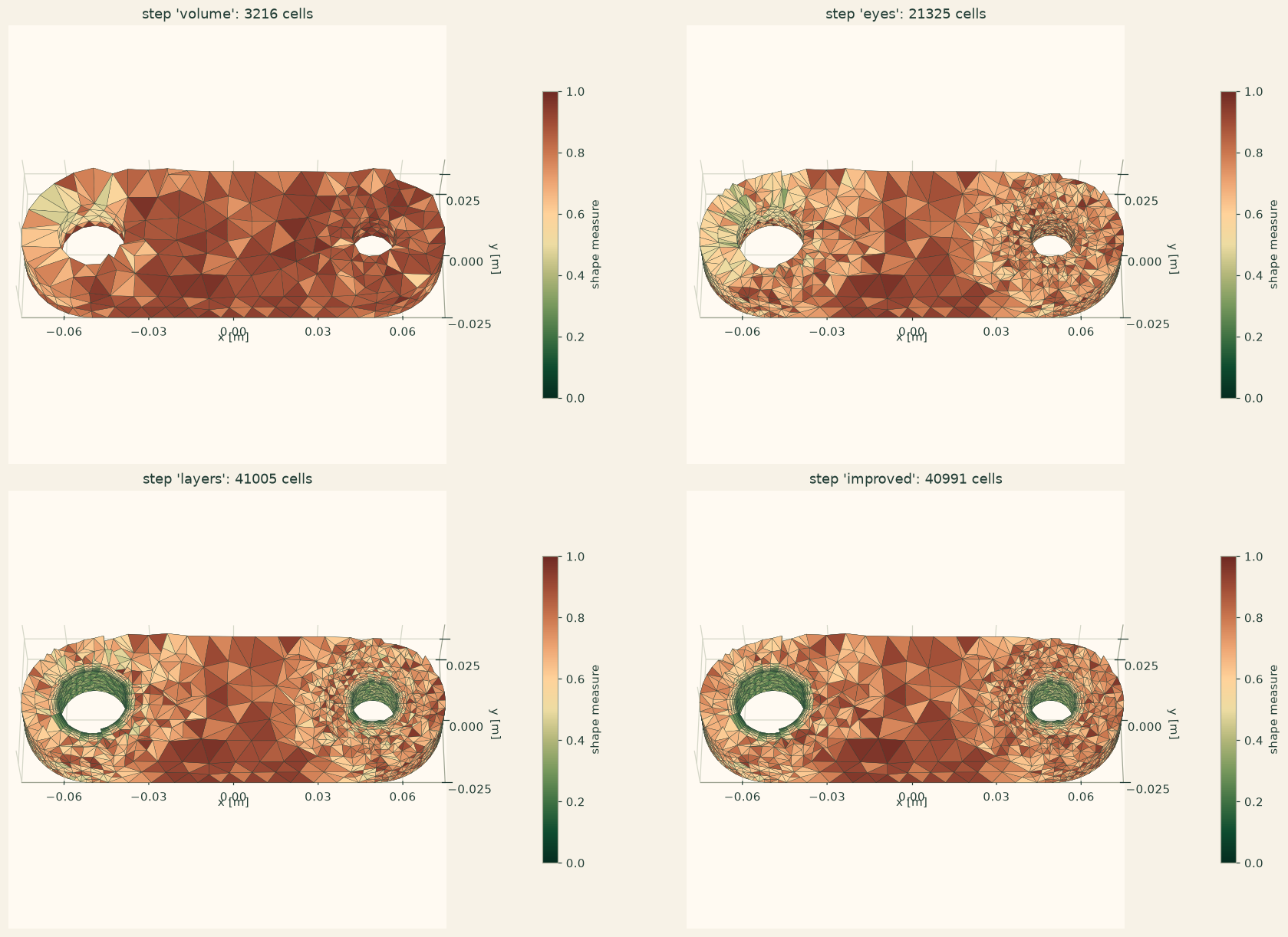
OneSimulation meshes the same part with Delaunay and advancing-front tetrahedra, swept hexahedra, polyhedra, grid tetrahedra and the automatic choice, and compares skewness and non-orthogonality across the cell kinds. A mesh recipe then chains tetrahedra, local refinement at the eyes, boundary layers on the eye walls and quality optimisation; changing the layers reruns only the last two steps.
What it checks
All six meshes fill the closed-form volume of 157.751 cm3 within 0.27 % (swept hexahedra -0.010 %); the automatic mesher picks the sweep, the rebuilt recipe keeps 'volume' and 'eyes' and reruns 'layers' and 'improved', and the five measured layer heights equal the stated 0.300 to 1.152 mm.
The notebook
The complete notebook, cell by cell. Run it to produce the figures and the comparison printout.
A mesh is rarely made in one call. It is a sequence of operations: a mesher fills the body, a refinement divides the cells where the solution will change fast, layers of flat cells are laid along walls, and the worst cells are improved. Which mesher starts the sequence depends on the part and on the solver: tetrahedra for any shape, hexahedra where a face can be swept through the body, polyhedra for finite volumes.
This tutorial meshes one part, a connecting link with a large and a small eye, with six meshers and then builds a sequence of four steps with MeshRecipe. A recipe remembers what each step was made from: built again after a change, it repeats only the changed step and the steps that follow it.
| step | operation |
|---|---|
volume | TetrahedralMesher(target_size=8 mm) on the part |
eyes | refined(mesh, cells=...): cells within 25 mm of an eye axis divided |
layers | layered_mesh(mesh, layers=...): boundary layers on both eye walls |
improved | optimized(mesh, threshold=0.5): face and edge swaps on the worst cells |
Reference. The volume of the part in closed form: a slot of straight length \(s\) and width \(w\) with two bores, \(V = t\,(s w + \pi w^2/4 - \pi r_1^2 - \pi r_2^2)\). Every mesh must fill it; swept hexahedra and grid tetrahedra approximate the round eyes by straight edges.
import numpy as np
from onesim.cad.d2 import Profile
from onesim.cad.d3 import Prism
from onesim.meshing import (
    AutomaticMesher,
    BoundaryLayers,
    MeshRecipe,
    OctreeMesher,
    PolyhedralMesher,
    SweepMesher,
    TetrahedralMesher,
    layered_mesh,
)
from onesim.meshing.quality import optimized, quality
from onesim.meshing.refinement import refined
from onesim.visualization import plots, theme

theme.set()
Geometry
The outline is a slot of 100 mm between the eye centres and 50 mm width; the two bores are holes of the outline with their own names, so the eye walls become the faces big_eye and small_eye of the prism.
straight, width, thickness, big, small = 0.10, 0.05, 0.025, 0.012, 0.008
outline = Profile.slot(straight, width).with_holes(
    Profile.circle(big, center=(-straight / 2, 0.0), name="big_eye"),
    Profile.circle(small, center=(straight / 2, 0.0), name="small_eye"),
)
link = Prism(profile=outline, height=thickness)
faces = link.boundaries
exact = thickness * (
    straight * width + np.pi * width**2 / 4 - np.pi * big**2 - np.pi * small**2
)
print(f"faces: {', '.join(face.id for face in link.faces)}")
print(f"volume: CAD {link.measure * 1e6:.4f} cm3, closed form {exact * 1e6:.4f} cm3")

view = plots.Camera(elevation=40, azimuth=-60)
Six meshers on the same part
Each mesher gets about the same cell size. The swept mesher lays quadrilaterals on the bottom face and copies them through the thickness in five layers; the automatic mesher recognises that the part is a straight sweep and chooses it by itself. Skewness and non-orthogonality are measured for every kind of cell, so the six meshes can be compared directly. The first figure shows the part with the faces the meshers use and the Delaunay mesh, the second the five meshes of tetrahedra and hexahedra and the number of cells of all six. The grid tetrahedra follow the straight edges of the part only as closely as their cubes are fine.
meshers = {
    "tetrahedra, Delaunay": TetrahedralMesher(target_size=0.005),
    "tetrahedra, advancing front": TetrahedralMesher(target_size=0.005, method="front"),
    "swept hexahedra": SweepMesher(source=faces.bottom, target_size=0.004, layers=5),
    "polyhedra": PolyhedralMesher(target_size=0.006),
    "grid tetrahedra": OctreeMesher(target_size=0.005),
    "automatic choice": AutomaticMesher(target_size=0.004),
}
meshes = {name: mesher.generate(link) for name, mesher in meshers.items()}
reports = {name: quality(mesh) for name, mesh in meshes.items()}
print(
    "mesher                         cells   kind          volume error   skewness mean / max   non-orthogonality max"
)
for name, mesh in meshes.items():
    report = reports[name]
    print(
        f"{name:28s} {mesh.cell_count:7d}   {report.family:12s} {100 * (report['size'].sum() / exact - 1):+10.3f} %"
        f" {report['skewness'].mean():12.2f} / {report['skewness'].max():4.2f} {np.degrees(report['non_orthogonality'].max()):18.1f} deg"
    )
print(f"the automatic mesher chose: {meshes['automatic choice'].method}")

fig = plots.figure(1, 2, size=(16, 6))
plots.geometry(
    link,
    selection={
        "large eye": faces.big_eye,
        "small eye": faces.small_eye,
        "sweep source": faces.bottom,
    },
    labels=False,
    camera=view,
    title="Connecting link and the faces the meshers use",
    ax=fig[0],
)
plots.mesh(
    meshes["tetrahedra, Delaunay"],
    groups=("all",),
    legend=False,
    camera=view,
    title=f"Delaunay tetrahedra: {meshes['tetrahedra, Delaunay'].cell_count} cells",
    ax=fig[1],
)
plots.show()

drawn = [name for name in meshes if name != "polyhedra"]
fig = plots.figure(2, 3, size=(18, 10))
for index, name in enumerate(drawn):
    plots.mesh(
        meshes[name],
        groups=("all",),
        legend=False,
        camera=view,
        title=f"{name}: {meshes[name].cell_count} cells",
        ax=fig[index],
    )
plots.bars(
    list(meshes),
    [mesh.cell_count for mesh in meshes.values()],
    horizontal=True,
    ylabel="number of cells",
    title="Cells of the six meshes",
    ax=fig[5],
)
plots.show()
A meshing sequence
The recipe names each step and what it works on. Three boundary layers of 0.3 mm growing by 1.4 cover both eye walls, where a bearing pin would press; the improvement swaps faces and edges of every cell whose shape measure is below 0.5.
near_eyes = (
    lambda middles: np.minimum(
        np.hypot(middles[:, 0] + straight / 2, middles[:, 1]),
        np.hypot(middles[:, 0] - straight / 2, middles[:, 1]),
    )
    < 0.025
)
walls = faces.big_eye | faces.small_eye
recipe = (
    MeshRecipe()
    .add("volume", TetrahedralMesher(target_size=0.008), on="geometry")
    .add("eyes", refined, on="volume", cells=near_eyes)
    .add(
        "layers",
        layered_mesh,
        on="eyes",
        layers=(BoundaryLayers(walls=walls, count=3, first_height=3e-4, growth=1.4),),
    )
    .add("improved", optimized, on="layers", threshold=0.5)
)
built = recipe.build(geometry=link)
print(built)

five = BoundaryLayers(walls=walls, count=5, first_height=3e-4, growth=1.4)
thicker = recipe.changed("layers", layers=(five,))
rebuilt = thicker.build(geometry=link, previous=built)
print(f"after the change of the layers: ran {rebuilt.ran}, kept {rebuilt.kept}")
print("step        cells   min shape   volume error")
for step in recipe.steps:
    report = quality(rebuilt[step])
    print(
        f"{step:9s} {rebuilt[step].cell_count:7d} {report['shape'].min():10.3f} {100 * (report['size'].sum() / exact - 1):+12.4f} %"
    )
print(
    f"layer heights of the last mesh: {', '.join(f'{1e3 * item['mean']:.3f}' for item in rebuilt.mesh.layer_report['layer_heights'])} mm, "
    f"stated {', '.join(f'{1e3 * height:.3f}' for height in five.layer_heights())} mm"
)
Figure
The four steps of the rebuilt sequence. The shape measure of the cells is shown in a cut through the middle of the link, so the refinement around the eyes and the flat layer cells on their walls are visible.
middle = ((0.0, 0.0, thickness / 2), (0.0, 0.0, 1.0))
top = plots.Camera(elevation=62, azimuth=-90)
fig = plots.figure(2, 2, size=(16, 11))
for index, step in enumerate(recipe.steps):
    plots.mesh(
        rebuilt[step],
        cell_values=quality(rebuilt[step])["shape"],
        limits=(0, 1),
        plane=middle,
        label="shape measure",
        camera=top,
        title=f"step '{step}': {rebuilt[step].cell_count} cells",
        ax=fig[index],
    )
plots.show()
Going further
Add a step with with_order(mesh, 2) for curved quadratic cells, replace the first step by the swept mesher for a hexahedral sequence, or hand several parts to mesh_batch(previous=...), which meshes only the parts that changed.