To reproduce the case, put its notebook and accompanying inputs in the same folder. Use the Python environment set up in the installation tutorial. Start with the original parameters and compare the result with the check reported below.
Run this example yourself. The OneSimulation Runtime brings the full Python library and an MCP server for Codex and Claude Code. It starts with a seven-day trial, then from €19 per month before any applicable tax.
What it computes
OneSimulation reads the triangles as a closed facet body and combines it with CAD cylinders through the signed distance to both bodies on a fine grid, which yields a new closed triangle body; it is filled with tetrahedra cut from a grid of cubes that follows the triangles. The script that writes the STL file comes with the notebook.
What it checks
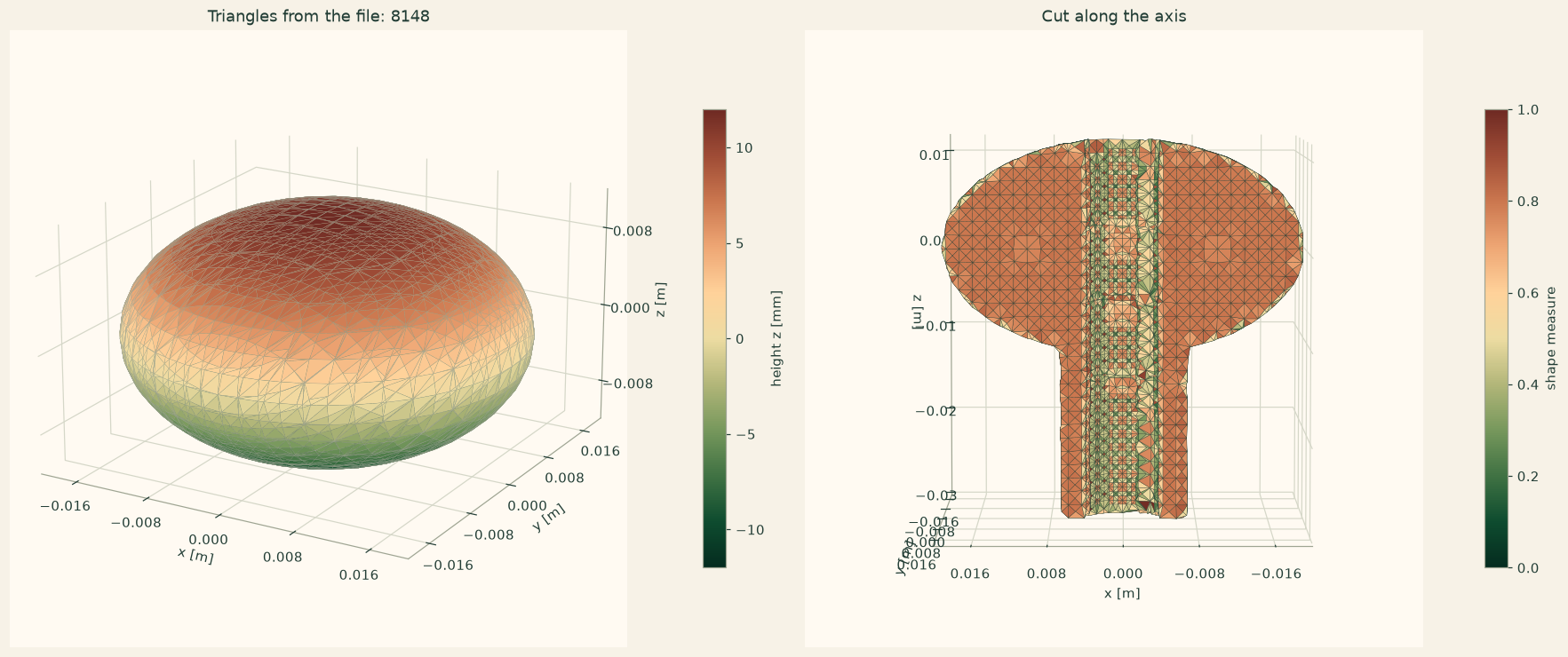
The triangulated knob holds 19.946 cm3 against 20.106 cm3 for the ellipsoid (-0.8 %), the stem adds 2.855 cm3 against the closed-form 2.829 cm3 (+0.9 %) and the bore removes 2.170 against 2.105 cm3 (+3.1 %, one grid step of 0.8 mm on a 4 mm bore); the mesh of 167,733 tetrahedra fills the combined body within 0.2 %.
The notebook
The complete notebook, cell by cell. Run it to produce the figures and the comparison printout.
Scanned parts, organic shapes and meshes exported from other programs come as triangles, not as exact surfaces. To fit them with CAD details, a mounting stem, a bore, a flange, the triangle body and the CAD objects are combined by Boolean operations:
| call | what it does |
|---|---|
load("knob.stl") | a closed FacetBody from the triangles |
body.combined(cad, "union", resolution) | the body joined with the CAD object, laid out anew as triangles on a grid of resolution steps |
body.combined(cad, "difference", resolution) | the CAD object cut out of the body |
OctreeMesher(target_size=...) | tetrahedra cut from a grid of cubes that follows the triangles |
The file cad_and_mesh_combined.stl is written by cad_and_mesh_combined_geometry.py: an ellipsoid with half axes \(a = 20\) mm (twice) and \(c = 12\) mm, triangulated from a level set on a grid of 2 mm.
Reference. A coaxial cylinder of radius \(\rho\) cuts from the ellipsoid the column \(V_c(\rho) = \tfrac43\pi a^2 c\,\big(1-(1-\rho^2/a^2)^{3/2}\big)\), half of it below the equator. The stem of radius \(\rho_s\) and length \(H\) below the equator adds \(\pi\rho_s^2 H - V_c(\rho_s)/2\); the bore of radius \(\rho_b\) through everything removes \(V_c(\rho_b) + \pi\rho_b^2 H - V_c(\rho_b)/2\).
import numpy as np
from onesim.cad.d3 import Cylinder
from onesim.cad.exchange import load
from onesim.meshing import OctreeMesher
from onesim.meshing.quality import quality
from onesim.visualization import plots, theme

theme.set()
The triangle body
The volume of the triangulated knob against the ellipsoid it approximates.
knob = load("cad_and_mesh_combined.stl")
a, c = 0.02, 0.012
print(
    f"knob: {len(knob.triangles)} triangles, closed {knob.is_closed}, faces {', '.join(face.id for face in knob.faces)}"
)
print(
    f"volume {knob.measure * 1e6:.4f} cm3, ellipsoid 4/3 pi a^2 c {4 / 3 * np.pi * a**2 * c * 1e6:.4f} cm3 "
    f"({knob.measure / (4 / 3 * np.pi * a**2 * c) - 1:+.2%})"
)
Adding the stem, drilling the bore
The stem is 30 mm long below the equator with 7 mm radius; the bore of 4 mm radius runs from the end of the stem through the top of the knob. The combined body is laid out anew on a grid of 96 steps across its extent (about 0.8 mm), from the signed distance to both bodies; its round edges are therefore resolved to about one grid step.
stem_radius, stem_length, bore_radius = 0.007, 0.03, 0.004
stem = Cylinder(
    radius=stem_radius, length=stem_length, origin=(0.0, 0.0, -stem_length)
).named("stem")
bore = Cylinder(
    radius=bore_radius,
    length=stem_length + 0.02,
    origin=(0.0, 0.0, -stem_length - 0.001),
).named("bore")
handle = knob.combined(stem, "union", 96)
drilled = handle.combined(bore, "difference", 96)

column = lambda rho: 4 / 3 * np.pi * a**2 * c * (1 - (1 - rho**2 / a**2) ** 1.5)
added = np.pi * stem_radius**2 * stem_length - column(stem_radius) / 2
removed = (
    column(bore_radius) + np.pi * bore_radius**2 * stem_length - column(bore_radius) / 2
)
print(
    f"stem added   {(handle.measure - knob.measure) * 1e6:8.4f} cm3, closed form {added * 1e6:8.4f} cm3"
)
print(
    f"bore removed {(handle.measure - drilled.measure) * 1e6:8.4f} cm3, closed form {removed * 1e6:8.4f} cm3"
)
print(f"combined body: closed {drilled.is_closed}, {len(drilled.triangles)} triangles")

mesh = OctreeMesher(target_size=0.0015, coarsening=1).generate(drilled)
view = plots.Camera(elevation=20, azimuth=-60)
fig = plots.figure(1, 2, size=(16, 7))
plots.geometry(
    drilled,
    selection={"combined body": drilled.boundaries.all},
    labels=False,
    camera=view,
    title="Scanned knob with CAD stem and bore",
    ax=fig[0],
)
plots.mesh(
    mesh,
    groups=("all",),
    legend=False,
    camera=view,
    title=f"Mesh of the combined body: {mesh.cell_count} tetrahedra",
    ax=fig[1],
)
plots.show()
Results
The volume of the mesh against the combined body and the shape of its cells.
report = quality(mesh)
print(
    f"mesh volume {report['size'].sum() * 1e6:.4f} cm3, body {drilled.measure * 1e6:.4f} cm3 ({report['size'].sum() / drilled.measure - 1:+.2%}); "
    f"smallest shape {report['shape'].min():.3f}, mean {report['shape'].mean():.3f}"
)
Figure
The original triangles of the knob, and the mesh cut open along the axis with the bore through knob and stem.
fig = plots.figure(1, 2, size=(16, 7))
plots.trisurface(
    knob.points,
    knob.triangles,
    1e3 * knob.points[:, 2],
    edges=True,
    limits=(-12, 12),
    label="height z [mm]",
    camera=view,
    title=f"Triangles from the file: {len(knob.triangles)}",
    ax=fig[0],
)
plots.mesh(
    mesh,
    cell_values=report["shape"],
    limits=(0, 1),
    plane=((0.0, 0.0, -0.005), (0.0, 1.0, 0.0)),
    label="shape measure",
    camera=plots.Camera(elevation=5, azimuth=90),
    title="Cut along the axis",
    ax=fig[1],
)
plots.show()
Going further
Thin out the triangles first with knob.simplified(tolerance), add a flange from a Box, or turn a body with flat and round faces into an exact solid with exact() and model on it in CAD.