To reproduce the case, put its notebook and accompanying inputs in the same folder. Use the Python environment set up in the installation tutorial. Start with the original parameters and compare the result with the check reported below.
Run this example yourself. The OneSimulation Runtime brings the full Python library and an MCP server for Codex and Claude Code. It starts with a seven-day trial, then from €19 per month before any applicable tax.
What it computes
OneSimulation sweeps the bar section along a path with rounded corners, drills the holes, places washers and bolts and joins all five parts in an assembly that lists the faces where two parts touch; every part is meshed with tetrahedra.
What it checks
Path length 287.1239 mm and the volumes of bar, washers and bolts match their closed forms to 1e-15, and the four contact faces have exactly the closed-form ring areas of 137.4447 mm2 (washer on bar) and 77.3146 mm2 (bolt head on washer).
The notebook
The complete notebook, cell by cell. Run it to produce the figures and the comparison printout.
Busbars carry large currents between the components of switchgear and power electronics; their temperature is set by Joule heating in the bar and by the contact resistance at the bolted joints. A model of a busbar therefore needs the bar, the bolts and washers as separate parts and the faces where they touch.
| part | built from |
|---|---|
busbar | Sweep of a 40 x 6 mm rectangle along a Z-shaped path with corners of 15 mm radius, less two holes of 9 mm |
washer_1, washer_2 | AnnularCylinder, 16 / 8.4 mm diameter, 1.6 mm thick, on the bar |
bolt_1, bolt_2 | UnionFromObjects of a head (13 mm, 5.5 mm high) and a shank (8 mm, 30 mm long) through the hole |
Assembly(parts=[...]) keeps one volume per part and lists the faces where two parts touch, assembly.interfaces, the faces for contact or thermal contact conditions.
Reference. The path of segments \(l_1, l_2, l_3\) with two corners of radius \(R\) has the length \(L = l_1 + l_2 + l_3 - 4R + \pi R\); the bar has \(V = b t L - 2\pi r_h^2 t\). A washer touches the bar on the ring between the hole and its outer edge, \(\pi(r_w^2 - r_h^2)\), and the bolt head on the ring \(\pi(r_k^2 - r_i^2)\) between the inner edge of the washer and the edge of the head.
import numpy as np
from onesim.cad.d2 import Profile
from onesim.cad.d3 import AnnularCylinder, Assembly, Cylinder, Sweep, UnionFromObjects
from onesim.meshing import TetrahedralMesher
from onesim.meshing.quality import quality
from onesim.visualization import plots, theme

theme.set()
Parts
The bar runs 120 mm along x, rises 80 mm and runs 100 mm on; the section is centred on the path. The holes sit 30 mm from each end.
breadth, thickness, corner, hole = 0.04, 0.006, 0.015, 0.0045
segments = (0.12, 0.08, 0.10)
path = [(0.0, 0.0, 0.0), (0.12, 0.0, 0.0), (0.12, 0.0, 0.08), (0.22, 0.0, 0.08)]
bar = Sweep(
    profile=Profile.rectangle(
        breadth, thickness, origin=(-breadth / 2, -thickness / 2)
    ),
    path=path,
    corner_radius=corner,
)
holes = [(0.03, 0.0, 0.0), (0.19, 0.0, 0.08)]
for index, (x, y, z) in enumerate(holes, start=1):
    bar = bar - Cylinder(radius=hole, length=0.02, origin=(x, y, z - 0.01)).named(
        f"hole_{index}"
    )
washer_outer, washer_inner, washer_thickness = 0.008, 0.0042, 0.0016
head_radius, head_height, shank_radius, shank_length = 0.0065, 0.0055, 0.004, 0.03
parts = [bar.named("busbar")]
for index, (x, y, z) in enumerate(holes, start=1):
    top = z + thickness / 2
    parts.append(
        AnnularCylinder(
            inner_radius=washer_inner,
            outer_radius=washer_outer,
            length=washer_thickness,
            origin=(x, y, top),
        ).named(f"washer_{index}")
    )
    parts.append(
        UnionFromObjects(
            objects=[
                Cylinder(
                    radius=head_radius,
                    length=head_height,
                    origin=(x, y, top + washer_thickness),
                ),
                Cylinder(
                    radius=shank_radius,
                    length=shank_length,
                    origin=(x, y, top + washer_thickness - shank_length),
                ),
            ]
        ).named(f"bolt_{index}")
    )
busbar = Assembly(parts=parts)
print(f"parts: {', '.join(part.id for part in busbar.volumes)}")

meshes = {
    part.id: TetrahedralMesher(target_size=0.004, curvature_angle=0.5).generate(
        busbar.part(part.id)
    )
    for part in busbar.volumes
}
view = plots.Camera(elevation=25, azimuth=-60)
fig = plots.figure(1, 2, size=(16, 7))
plots.geometry(
    busbar,
    selection={part.id: busbar.volume_of(part.id) for part in busbar.volumes},
    labels=False,
    camera=view,
    title="Busbar with washers and bolts",
    ax=fig[0],
)
plots.mesh(
    meshes["busbar"],
    groups=("all",),
    legend=False,
    camera=view,
    title=f"Mesh of the bar: {meshes['busbar'].cell_count} tetrahedra",
    ax=fig[1],
)
plots.show()
Results
Path length and volumes of every part, then every contact face of the assembly with its area.
length = sum(segments) - 4 * corner + np.pi * corner
closed = {
    "busbar": breadth * thickness * length - 2 * np.pi * hole**2 * thickness,
    **{
        f"washer_{k}": np.pi * (washer_outer**2 - washer_inner**2) * washer_thickness
        for k in (1, 2)
    },
    **{
        f"bolt_{k}": np.pi
        * (head_radius**2 * head_height + shank_radius**2 * shank_length)
        for k in (1, 2)
    },
}
print(
    f"path length {Sweep(profile=Profile.rectangle(breadth, thickness), path=path, corner_radius=corner).length * 1e3:.4f} mm, "
    f"closed form {length * 1e3:.4f} mm"
)
print("part        CAD [cm3]    mesh [cm3]   closed form [cm3]   deviation CAD")
for part in busbar.volumes:
    meshed = quality(meshes[part.id])["size"].sum()
    print(
        f"{part.id:9s} {part.measure * 1e6:11.5f} {meshed * 1e6:12.5f} {closed[part.id] * 1e6:16.5f} {part.measure / closed[part.id] - 1:+15.1e}"
    )
rings = {
    "busbar": np.pi * (washer_outer**2 - hole**2),
    "bolt": np.pi * (head_radius**2 - washer_inner**2),
}
print("contact                 area [mm2]   closed form [mm2]")
for contact in busbar.interfaces:
    other = "busbar" if "busbar" in contact.parts else "bolt"
    print(
        f"{' / '.join(contact.parts):22s} {contact.area * 1e6:11.4f} {rings[other] * 1e6:16.4f}"
    )
Figure
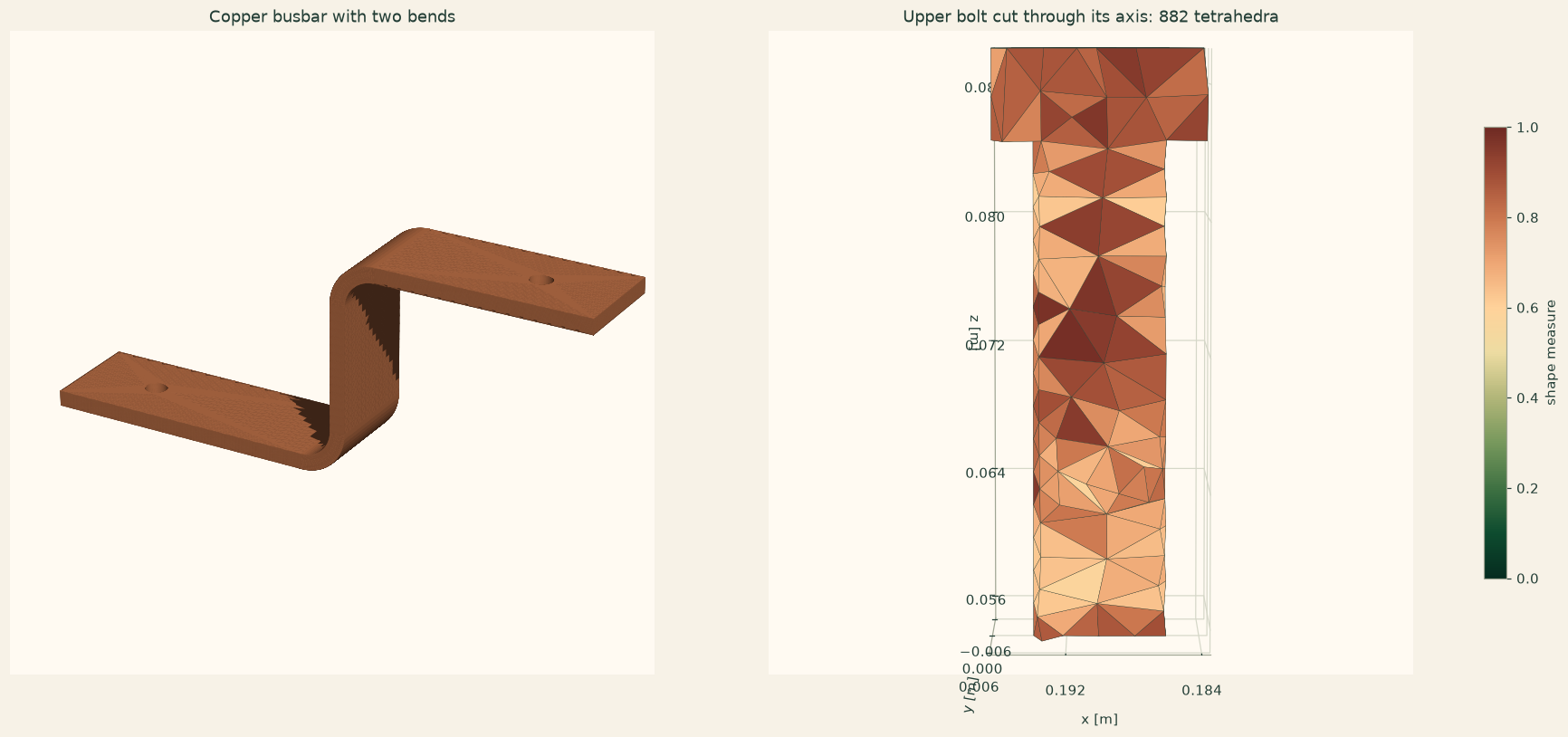
The copper bar with its two bends, and the mesh of the upper bolt cut through its axis.
fig = plots.figure(1, 2, size=(16, 7))
plots.render(
    bar, camera=view, material="copper", title="Copper busbar with two bends", ax=fig[0]
)
plots.mesh(
    meshes["bolt_2"],
    cell_values=quality(meshes["bolt_2"])["shape"],
    limits=(0, 1),
    plane=((0.19, 0.0, 0.08), (0.0, 1.0, 0.0)),
    label="shape measure",
    camera=plots.Camera(elevation=5, azimuth=90),
    title=f"Upper bolt cut through its axis: {meshes['bolt_2'].cell_count} tetrahedra",
    ax=fig[1],
)
plots.show()
Going further
Pass the current through the bar and heat it with onesim.physics (Joule heating), give each contact face a contact resistance, or replace the simple bolts by screw("M8", 0.03) with its thread.