To reproduce the case, put its notebook and accompanying inputs in the same folder. Use the Python environment set up in the installation tutorial. Start with the original parameters and compare the result with the check reported below.
Run this example yourself. The OneSimulation Runtime brings the full Python library and an MCP server for Codex and Claude Code. It starts with a seven-day trial, then from €19 per month before any applicable tax.
What it computes
OneSimulation lays quadrilaterals on a source face and carries them through the body: four equal or six geometrically graded layers through the bracket, thirty layers along the three pieces of the strap. Tetrahedral meshes of the same size are made for comparison of cell count, volume and scaled Jacobian.
What it checks
The bracket volume of 134.972 cm3 is met within 0.10 % by the hexahedra (4,632 cells against 7,226 tetrahedra, smallest scaled Jacobian 0.52 against 0.21), the graded layers grow by exactly the stated factor 3.00, and the strap mesh of 900 hexahedra matches the closed-form 15.2549 cm3 within 0.13 %.
The notebook
The complete notebook, cell by cell. Run it to produce the figures and the comparison printout.
A body that is one face carried along a path, straight or round a bend, can be filled with hexahedra layer by layer. Swept meshes need far fewer cells than tetrahedra for the same size, their layers follow the part, and the number and the thickness of the layers is free: thin layers near a face where the solution changes fast, few layers through a thin wall.
SweepMesher(source=face, target_size=..., layers=...) meshes the source face with quadrilaterals and copies them through the body. It finds the face opposite the source, or follows the side faces round a bend when the body is swept along a curved path; layers is a number of equal layers or a distribution such as Geometric(cells=6, ratio=3) counted from the source.
| part | built from | source face | sweep |
|---|---|---|---|
| gusset bracket | Prism of a rounded outline with three holes | bottom | straight, 12 mm |
| bent strap | Sweep of a 30 x 4 mm section along a path with a 30 mm corner | start | three pieces, one sweep |
Reference. The exact volumes of the parts: the bracket as its outline area times the thickness, the strap as \(V = b\,t\,L\) with the path length \(L = (h - R) + (l - R) + \pi R / 2\) of two straight pieces and a quarter circle of radius \(R\).
import numpy as np
from onesim.cad.d2 import Profile
from onesim.cad.d3 import Prism, Sweep
from onesim.meshing import Geometric, SweepMesher, TetrahedralMesher
from onesim.meshing.quality import quality
from onesim.visualization import plots, theme

theme.set()
Geometry
The bracket outline is a five-sided plate of 150 x 120 mm with rounded corners; two bolt holes of 12 mm and a lightening hole of 36 mm become faces of their own names. The strap rises 60 mm, turns through a corner of 30 mm radius and runs 80 mm on.
outline = Profile.rounded_polygon(
    [(0.0, 0.0), (0.15, 0.0), (0.15, 0.025), (0.035, 0.12), (0.0, 0.12)],
    [0.008, 0.008, 0.01, 0.01, 0.008],
).with_holes(
    Profile.circle(0.006, center=(0.12, 0.0125), name="bolt_lower"),
    Profile.circle(0.006, center=(0.0175, 0.09), name="bolt_upper"),
    Profile.circle(0.018, center=(0.045, 0.04), name="lightening"),
)
thickness = 0.012
bracket = Prism(profile=outline, height=thickness)
section, rise, run, corner = (0.03, 0.004), 0.06, 0.08, 0.03
strap = Sweep(
    profile=Profile.rectangle(*section, origin=(-section[0] / 2, -section[1] / 2)),
    path=[(0.0, 0.0, 0.0), (0.0, 0.0, rise), (run, 0.0, rise)],
    corner_radius=corner,
)
path_length = (rise - corner) + (run - corner) + np.pi * corner / 2
print(
    f"bracket: faces {', '.join(face.id for face in bracket.faces)}; volume {bracket.measure * 1e6:.4f} cm3 "
    f"= outline area x thickness {outline.area * thickness * 1e6:.4f} cm3"
)
print(
    f"strap: path length {strap.length * 1e3:.3f} mm (closed form {path_length * 1e3:.3f} mm), "
    f"volume {strap.measure * 1e6:.4f} cm3 (closed form {section[0] * section[1] * path_length * 1e6:.4f} cm3)"
)

swept = SweepMesher(
    source=bracket.boundaries.bottom, target_size=0.005, layers=4
).generate(bracket)
view = plots.Camera(elevation=35, azimuth=-60)
fig = plots.figure(1, 2, size=(16, 6))
plots.geometry(
    bracket,
    selection={
        "source face": bracket.boundaries.bottom,
        "bolt holes": bracket.boundaries.bolt_lower | bracket.boundaries.bolt_upper,
        "lightening hole": bracket.boundaries.lightening,
    },
    labels=False,
    camera=view,
    title="Gusset bracket",
    ax=fig[0],
)
plots.mesh(
    swept,
    groups=("all",),
    legend=False,
    camera=view,
    title=f"Swept mesh: {swept.cell_count} hexahedra in 4 layers",
    ax=fig[1],
)
plots.show()
Straight sweep through the bracket
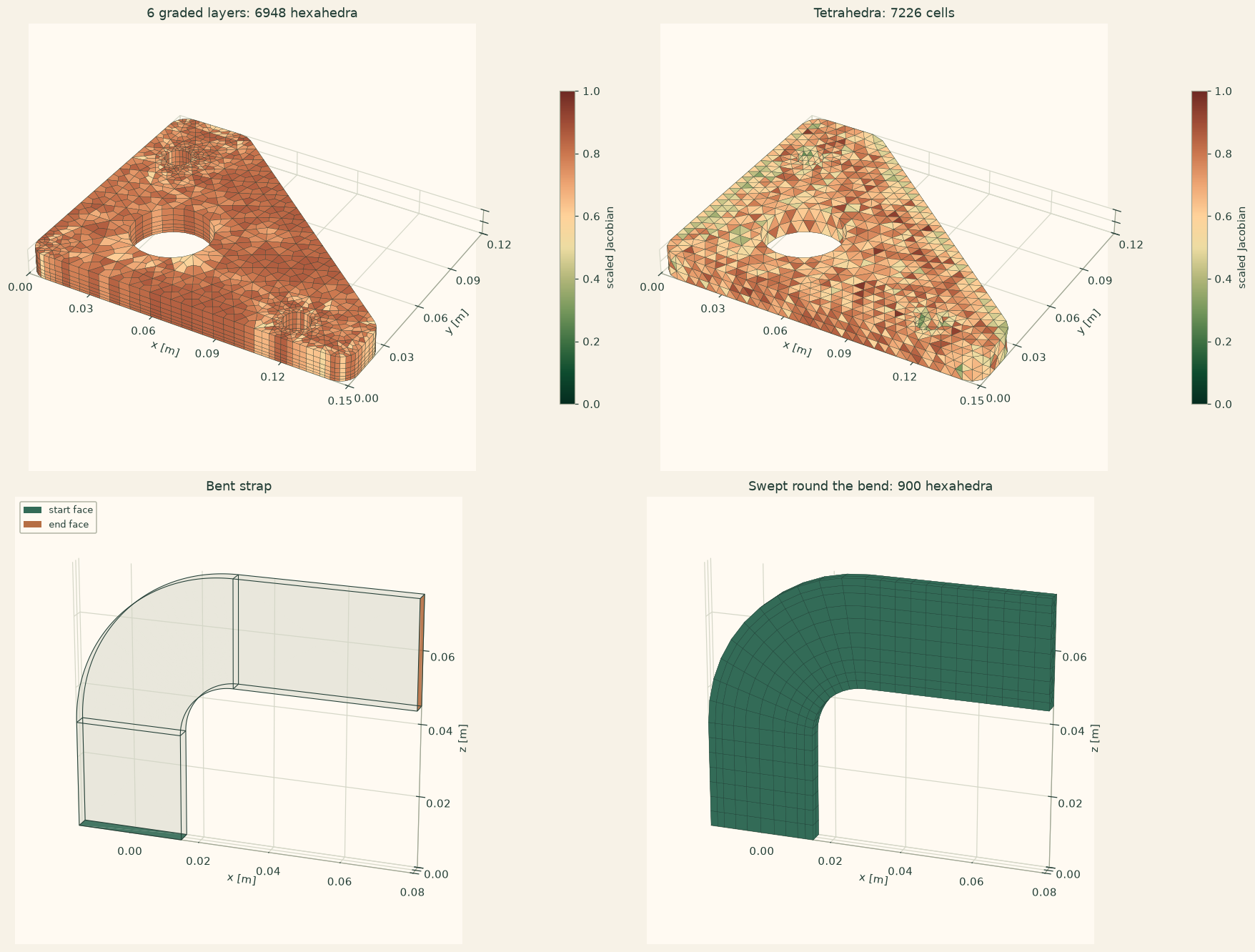
Four equal layers, six layers that grow by a factor of three from the source face, and a tetrahedral mesh of the same size for comparison. The scaled Jacobian (1 for a perfect cell, 0 for a flat one) and the shape measure tell how well the cells are formed.
meshes = {
    "4 equal layers": swept,
    "6 graded layers": SweepMesher(
        source=bracket.boundaries.bottom,
        target_size=0.005,
        layers=Geometric(cells=6, ratio=3.0),
    ).generate(bracket),
    "tetrahedra": TetrahedralMesher(target_size=0.005).generate(bracket),
}
print(
    "mesh               cells   kind          volume error   scaled Jacobian min   shape mean"
)
for name, mesh in meshes.items():
    report = quality(mesh)
    print(
        f"{name:16s} {mesh.cell_count:7d}   {report.family:12s} {100 * (report['size'].sum() / bracket.measure - 1):+10.3f} %"
        f" {report['scaled_jacobian'].min():18.3f} {report['shape'].mean():12.3f}"
    )
heights = np.unique(
    np.round(np.asarray(meshes["6 graded layers"].coordinates)[:, 2], 9)
)
print(
    f"graded layers: heights {', '.join(f'{1e3 * h:.2f}' for h in heights)} mm; "
    f"last to first layer {np.diff(heights)[-1] / np.diff(heights)[0]:.2f} (stated 3)"
)
Sweep round the bend of the strap
The strap has no face opposite its start face in a straight line; the mesher follows its side faces through the three pieces and shares the 30 layers out by their lengths. Every layer holds the same quadrilaterals as the start face.
bent = SweepMesher(
    source=strap.boundaries.start, target_size=0.004, layers=30
).generate(strap)
bent_tetrahedra = TetrahedralMesher(target_size=0.004).generate(strap)
per_layer = len(bent.facets(strap.boundaries.start))
print(
    f"strap: {per_layer} quadrilaterals on the start face, {len(bent.facets(strap.boundaries.end))} on the end face, "
    f"{bent.cell_count // per_layer} layers"
)
for name, mesh in {"swept hexahedra": bent, "tetrahedra": bent_tetrahedra}.items():
    report = quality(mesh)
    print(
        f"{name:16s} {mesh.cell_count:7d} cells, volume error {100 * (report['size'].sum() / strap.measure - 1):+.3f} %, "
        f"scaled Jacobian min {report['scaled_jacobian'].min():.3f}"
    )
Figure
The graded sweep and the tetrahedra of the bracket coloured by the scaled Jacobian of their cells, the strap with its start face, and its swept mesh round the bend.
strap_view = plots.Camera(elevation=20, azimuth=-70)
fig = plots.figure(2, 2, size=(16, 12))
plots.mesh(
    meshes["6 graded layers"],
    cell_values=quality(meshes["6 graded layers"])["scaled_jacobian"],
    limits=(0, 1),
    label="scaled Jacobian",
    camera=view,
    title=f"6 graded layers: {meshes['6 graded layers'].cell_count} hexahedra",
    ax=fig[0],
)
plots.mesh(
    meshes["tetrahedra"],
    cell_values=quality(meshes["tetrahedra"])["scaled_jacobian"],
    limits=(0, 1),
    label="scaled Jacobian",
    camera=view,
    title=f"Tetrahedra: {meshes['tetrahedra'].cell_count} cells",
    ax=fig[1],
)
plots.geometry(
    strap,
    selection={"start face": strap.boundaries.start, "end face": strap.boundaries.end},
    labels=False,
    camera=strap_view,
    title="Bent strap",
    ax=fig[2],
)
plots.mesh(
    bent,
    groups=("all",),
    legend=False,
    camera=strap_view,
    title=f"Swept round the bend: {bent.cell_count} hexahedra",
    ax=fig[3],
)
plots.show()
Going further
Sweep a revolved part (Revolution(..., angle=np.pi / 2)) from its start face, give the edges of the source face their own sizes with SweepMesher(sizes=((edges, size),)), or join the swept mesh of one part with the tetrahedra of another through hybrid_mesh.